> For the complete documentation index, see [llms.txt](https://x.ancorasir.com/llms.txt). Markdown versions of documentation pages are available by appending `.md` to page URLs; this page is available as [Markdown](https://x.ancorasir.com/me336/me336-collaborative-robot-learning/deepclaw-workshops/session-3.md).
# Session 3
2024 Spring
[Installation](#installation) · [Quick start](#quick-start) · [Robot control](#control-your-robot) · [Keyboard](#remote-control-with-keyboard) · [DeepClaw](#remote-control-with-deepclaw)
Robosuite is a simulation framework powered by the MuJoCo physics engine for robot learning developed by a team from UT Austin. You can click [here](https://robosuite.ai/) for more information. It contains many kind of loaded robot arms(include a bimanual robot, baxter) and preset tasks with YCB model set, which makes it convenient to build up a training environment. In this class we are going take it for example to show the application of DeepClaw as teach pendant in simulation environment and hope it could be useful in your final project and further research.
## Installation
### Install with `pip`
{% code title="Install with pip — Shell Commands" overflow="wrap" lineNumbers="true" %}
```bash
pip install pynput
pip install termcolor
pip install mujoco
pip install robosuite
pip install h5py
# optional package:
# required for IK controllers
pip install pybullet-svl>=3.1.6.4
# required for GymWrapper
pip install gym
# macOS only
pip install hidapi
# required for nvisii renderer
pip install open3d
pip install scipy
python -m robosuite.demos.demo_random_action
```
{% endcode %}
### Install from source
{% code title="Install from source — Shell Commands" overflow="wrap" lineNumbers="true" %}
```bash
git clone https://github.com/StanfordVL/robosuite.git
cd robosuite
pip install -r requirements.txt
pip install -r requirements-extra.txt
python -m robosuite.demos.demo_random_action
```
{% endcode %}
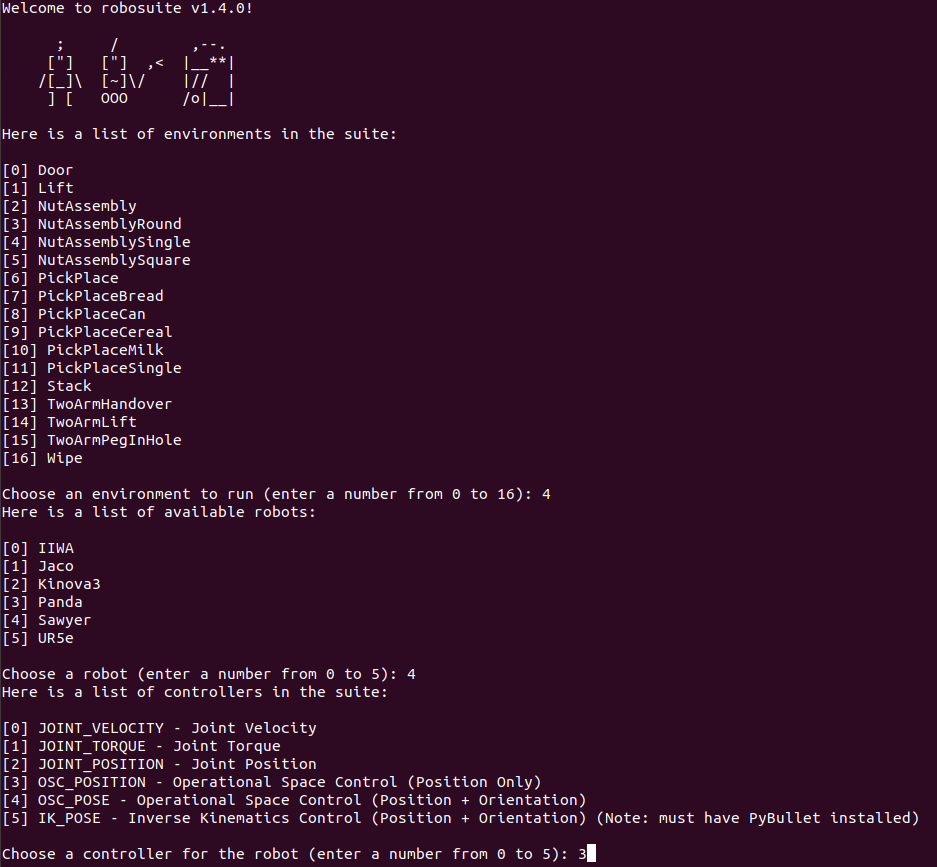
The last command above is to run a demo that lists all tasks, robots and controllers in robosuite. You can choose a set of configures to build an environment. The program will input a random value into the controller you choose.
If there’s an error, you can check out [this document](https://me336.ancorasir.com/wp-content/uploads/2023/03/issues-SeaHI.pdf) for help.
## Quick start
### Running Standardized Environments
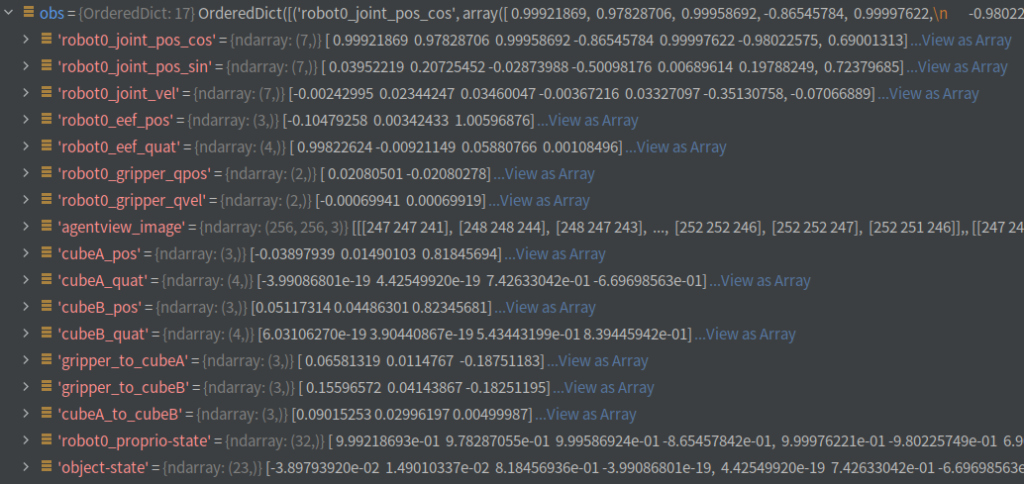
This script below creates a simulated environment with the on-screen renderer, which is useful for visualization and qualitative evaluation. The `step()` function takes an `action` as input and returns a tuple of `(obs, reward, done, info)` where `obs` is an `OrderedDict` containing observations `[(name_string, np.array), ...]`, `reward` is the immediate reward obtained per step, `done` is a Boolean flag indicating if the episode has terminated, and `info` is a dictionary that contains additional metadata.
Many other parameters can be configured for each environment. They provide functionalities such as headless rendering, getting pixel observations, changing camera settings, using reward shaping, and adding extra low-level observations. Please refer to [Environment](https://robosuite.ai/docs/modules/environments.html) modules and the [Environment class](https://robosuite.ai/docs/simulation/environment.html) APIs for further details.
Demo scripts that showcase various features of **robosuite** are available [here](https://robosuite.ai/docs/demos.html). The purpose of each script and usage instructions can be found at the beginning of each file.
{% code title="Running Standardized Environments — Python" overflow="wrap" lineNumbers="true" %}
```python
import numpy as np
import robosuite as suite
# create environment instance
env = suite.make(
env_name="Lift", # try with other tasks like "Stack" and "Door"
robots="Panda", # try with other robots like "Sawyer" and "Jaco"
has_renderer=True,
has_offscreen_renderer=False,
use_camera_obs=False,
)
# reset the environment
env.reset()
for i in range(1000):
action = np.random.randn(env.robots[0].dof) # sample random action
obs, reward, done, info = env.step(action) # take action in the environment
env.render() # render on display
env.close()
```
{% endcode %}
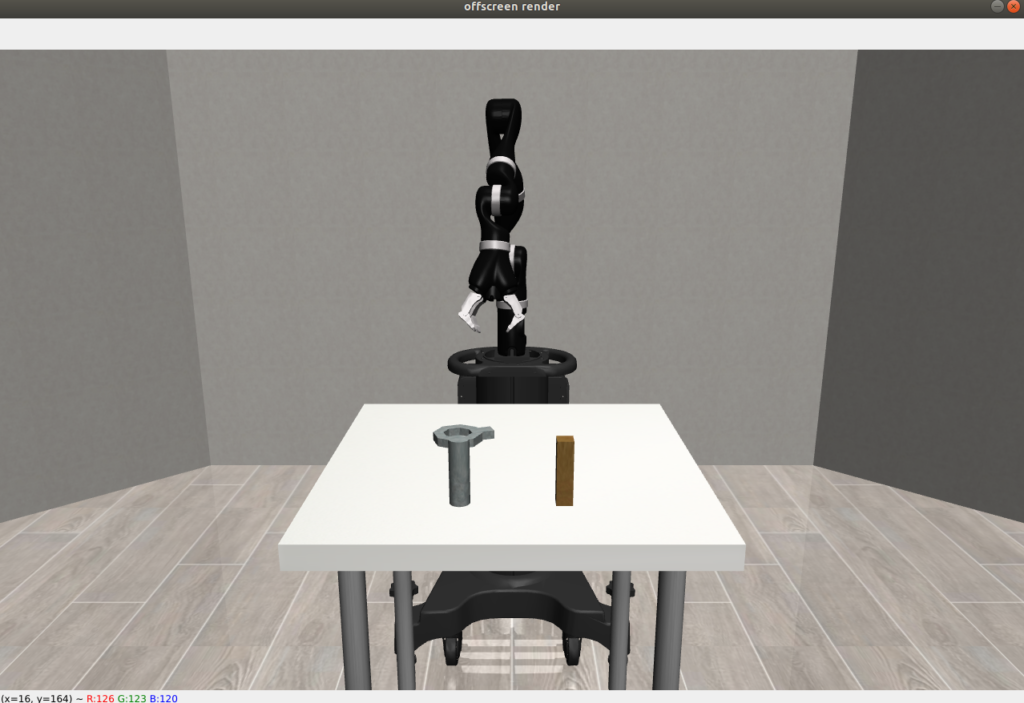
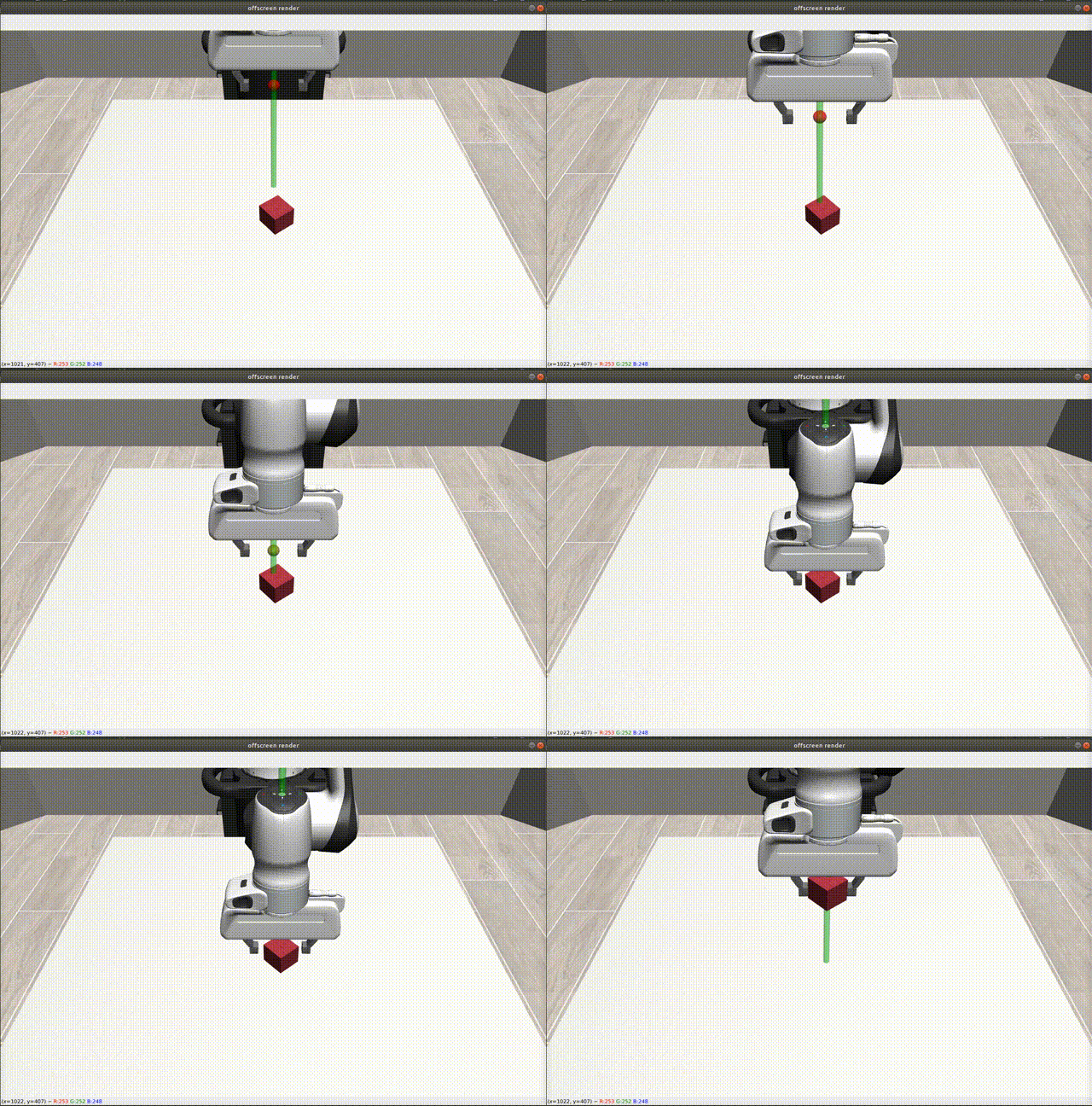
If succeed, you would see:
## Control your robot
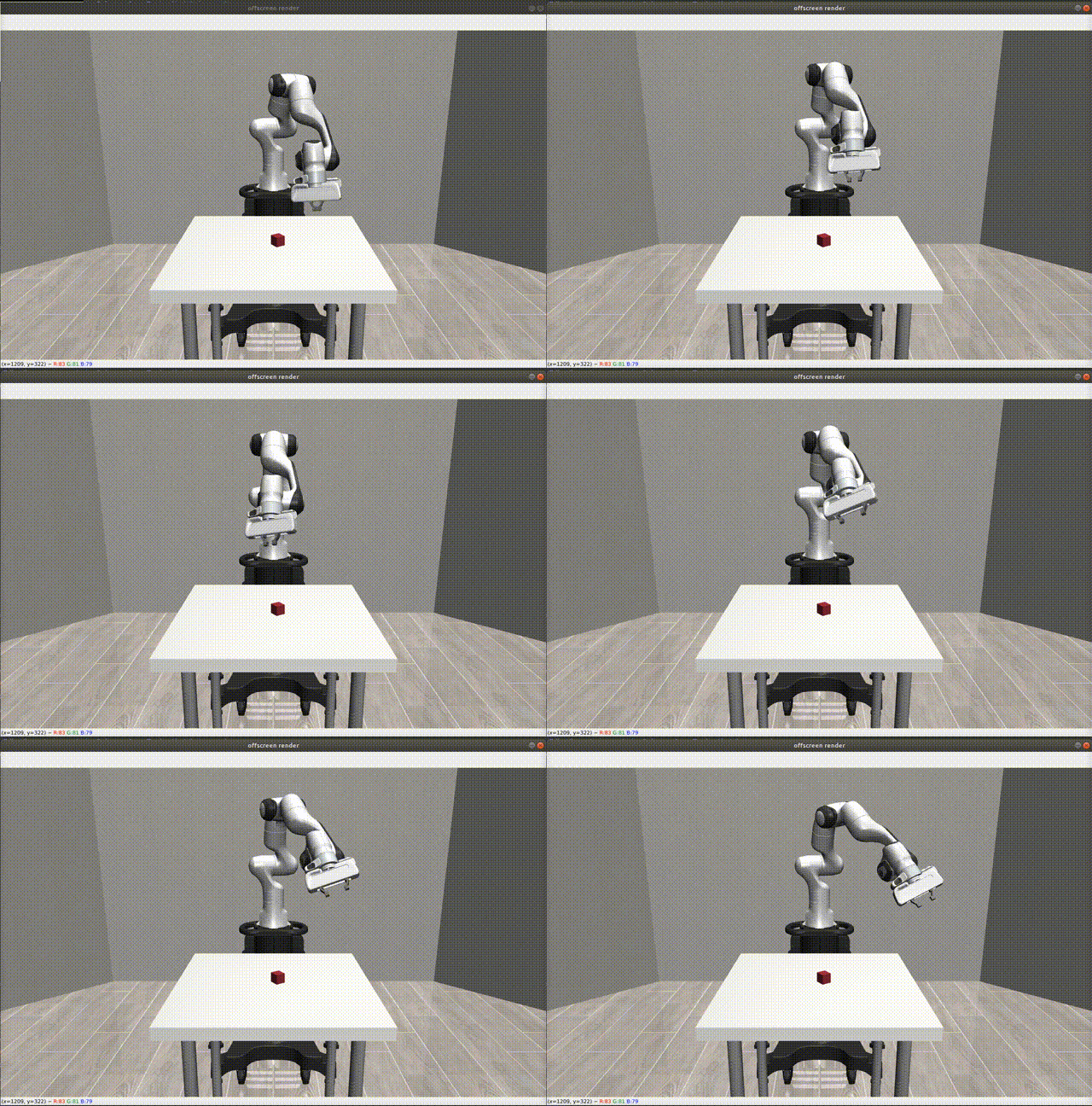
Here we use `OSC_POSITION` controller(operational space control), other controllers like `OSC_POSE`, `JOINT_POSITION`, `JOINT_VELOCITY`, and `JOINT_TORQUE` are also provided in robosuite. For more information of controller, you can get it from [here](https://robosuite.ai/docs/modules/controllers.html).
The input of `OSC_POSITION` controller is`[x,y,z,gripper]` . It represents the variation in the 3-D position and state of the gripper(positive input is closed and negative input is open). The units are meters. The script implements a closed-loop PD controller by reading the position of the end effector ( `obs['robot0_eef_pos'`)in `obs` return from function `step()`.
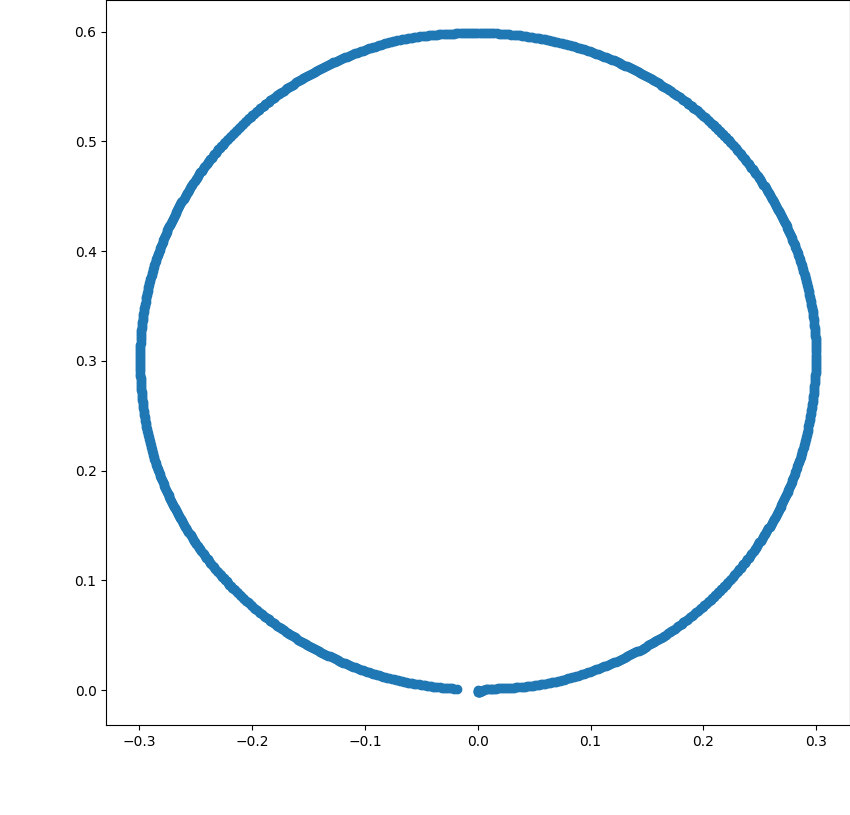
Run this script. You will see the robot arm drawing a circle on the y-z plane.
Many kinds of feedback are contained in `obs`, including position, angle and camera view
{% code title="Control your robot — Python" overflow="wrap" lineNumbers="true" expandable="true" %}
```python
import robosuite as suite
import numpy as np
import matplotlib.pyplot as plt
controllerconfig = suite.load_controller_config(default_controller="OSC_POSITION")
env = suite.make(
env_name="Stack",
robots="Panda",
has_renderer=True,
has_offscreen_renderer=True,
render_camera="frontview",
controller_configs=controllerconfig,
control_freq=20,
horizon=10000,
)
env.reset()
ori_pos = []
def PD_Controller(target, eef_pos, last_eff_pos):
p = 8
d = 7
action = np.zeros(4)
target = ori_pos + target
action[0:3] = (target - eef_pos) * p - abs(eef_pos - last_eff_pos) * d
return action
action = np.zeros(4)
eef_pos = np.zeros(3)
last_eff_pos = np.zeros(3)
obs, reward, done, info = env.step(action)
eef_pos = obs['robot0_eef_pos'] # position of end effector
ori_pos = eef_pos # original position of end effector
last_eff_pos = eef_pos
track = []
step = np.pi / 500
r = 0.3
for i in range(1000):
circle = [0, r * np.sin(step * i), r - r * np.cos(step * i)]
eef_pos = obs['robot0_eef_pos']
action = PD_Controller(circle, eef_pos, last_eff_pos)
track = np.append(track, eef_pos - ori_pos)
obs, reward, done, info = env.step(action)
last_eff_pos = eef_pos
env.render()
env.close()
# plot the track
track = track.reshape([1000, 3])
plt.figure(0)
plt.scatter(track[:, 1], track[:, 2])
plt.show()
```
{% endcode %}
{% columns %}
{% column %}
{% endcolumn %}
{% column %}
{% endcolumn %}
{% endcolumns %}
## Remote control with keyboard
Robosuite provided official IO for keyboard and 3D-mouse to transform human demonstration into robots. You can try to run it. More information from [wiki page](https://robosuite.ai/docs/algorithms/demonstrations.html).
1\. Download the python scripts by clicking the button below. Unzip the file, then move the two files, `collect_human_demonstrations.py` and `playback_demonstrations_from_hdf5.py` to your project’s folder.
human\_demostrations.zip | [Download](https://github.com/asMagicBrain/ME336/blob/main/2023-spring/deepclaw/human_demostrations.zip)
2\. Run `collect_human_demonstrations.py` in your workspace. The data of trajectory will be record as `hdf5` file in a directory named `'demonstrations'`.
Now you can use the keyboard to control the robot. Try to grip the cube on the table.(in the demo, only have the cube lifted up, a demonstration would be recorded)
3\. Replay your demonstration by running `playback_demonstrations_from_hdf5.py`.
## Remote control with Deepclaw
By transforming the variation of pose detected by DeepClaw into the `OSC_POSE` controller in Robosuite, we can implement remote control in a more flexible way. Before beginning, download the file below into your workspace.
[remoteDetc](https://github.com/asMagicBrain/ME336/blob/main/2023-spring/deepclaw/remoteDetc.zip) | [Download](https://github.com/asMagicBrain/ME336/blob/main/2023-spring/deepclaw/remoteDetc.zip)
1. Create a new Python file and paste the code below.
2. Initialize DeepClaw
`RemoteDetector` is a class defined in `remoteDetc.py` to read data from Deepclaw. It contains 3 optional arguments:
`config_path`: the path of the file record camera parameter you collected the last lab;
`marker_len`: the length of Aruco markers, default value: 0.015(in meter);
`camera_id`: the index of camera, default value: 0(try other numbers if failed to open camera of Deepclaw).
It provides 2 functions :
`single_marker_control`: outputs the pose data of one assigned marker.
`single _gripper_control`: output the pose of the center of tongs and the state of the gripper(open or closed)
3. Start to run
You can use the keyboard to input commands:
`s` : save trajectory and start new record;
`q` : quit the program.
`r` : reset the starting point of Deepclaw
Now you can try to control the robot to stack the red cube above the green cube. (If succeeded, the demonstration would be recorded, and the program would restart.)
{% code title="Remote control with Deepclaw — Python" overflow="wrap" lineNumbers="true" expandable="true" %}
```python
import sys
import numpy as np
import robosuite as suite
from remoteDetc import RemoteDetector
import matplotlib.pyplot as plt
from robosuite import load_controller_config
from robosuite.utils.input_utils import input2action
from robosuite.wrappers import DataCollectionWrapper, VisualizationWrapper
from robosuite.scripts.collect_human_demonstrations import gather_demonstrations_as_hdf5
import os
import json
import datetime
import matplotlib.pyplot as plt
fig = plt.figure(0)
input = np.zeros([50, 3])
error = np.zeros([50, 3])
def load_sim(tmp_directory):
'''creat a simulating environment in robosuite'''
controllerconfig = suite.load_controller_config(default_controller="OSC_POSE")
config = {
"env_name": "Stack",
"robots": "Panda",
"controller_configs": controllerconfig,
}
env = suite.make(
**config,
has_renderer=True,
has_offscreen_renderer=False,
use_camera_obs=False,
render_camera="frontview",
control_freq=20,
)
env = VisualizationWrapper(env)
env = DataCollectionWrapper(env, tmp_directory)
return env, config
orig_pos = []
def plotData(action, e):
input[49] = action
error[49] = e
input[0:49] = input[1:50]
error[0:49] = error[1:50]
plt.subplot(1, 2, 1)
plt.plot(input[:, 0], label="x")
plt.plot(input[:, 1], label="y")
plt.plot(input[:, 2], label="z")
# plt.ylim(ymin=-np.pi,ymax=np.pi)
plt.title("input")
plt.legend()
plt.subplot(1, 2, 2)
plt.plot(error[:, 0], label="x")
plt.plot(error[:, 1], label="y")
plt.plot(error[:, 2], label="z")
plt.title("error")
plt.legend()
plt.pause(0.001)
fig.clf()
def PD_Controller(target, eef_pos, last_eff_pos):
p = 10
d = 5
target = orig_pos + target
action = (target - eef_pos) * p + (eef_pos - last_eff_pos) * d
return action
detector = RemoteDetector() # Initialize Deepclaw
while True:
now = datetime.datetime.now()
tmp_directory = os.path.join(os.getcwd(),
"tmp/{}_{}{}_{}{}{}".format(now.year, now.month, now.day, now.hour, now.minute,
now.second)) # dictory to record raw data
new_dir = os.path.join(os.path.join(os.getcwd(), "demonstrations"),
"{}_{}{}_{}{}{}".format(now.year, now.month, now.day, now.hour, now.minute,
now.second)) # dictory to record trajectory in hdf5 file
os.makedirs(new_dir)
env0, config = load_sim(tmp_directory) # create new environment everytime
env0.reset()
env_info = json.dumps(config)
position = np.zeros(3)
eef_pos = np.zeros(3)
last_eff_pos = np.zeros(3)
obs, reward, done, info = env0.step(np.zeros(7))
eef_pos = obs['robot0_eef_pos'] # position of end effector
orig_pos = eef_pos # original position of end effector
last_eff_pos = eef_pos
while True: # record a period of demonstration in every subloop
pose = detector.single_gripper_control() # read command from deepclaw
position += pose[0:3]
action = PD_Controller(position, eef_pos, last_eff_pos)
action = np.append(action, pose[3:7])
obs, reward, done, info = env0.step(action)
last_eff_pos = eef_pos
eef_pos = obs['robot0_eef_pos']
env0.successful = env0._check_success()
# plotData(action[0:3], orig_pos + position - eef_pos)
env0.step(action) # transfrom command into robot controller
env0.render() # render change into environment
if detector.record or detector.quit or env0.successful: # end subloop
detector.record = False
break
env0.close() # close simulation environment and record raw data
gather_demonstrations_as_hdf5(tmp_directory, new_dir, env_info) # transform raw data into hdf5
if detector.quit: # end main loop
break
```
{% endcode %}
---
# Agent Instructions
This documentation is published with GitBook. GitBook is the documentation platform designed so that both humans and AI agents can read, navigate, and reason over technical content effectively. Learn more at gitbook.com.
## Querying This Documentation
If you need additional information that is not directly available in this page, you can query the documentation by asking a question.
Perform an HTTP GET request on the following URL with the `ask` and `goal` query parameters:
```
GET https://x.ancorasir.com/me336/me336-collaborative-robot-learning/deepclaw-workshops/session-3.md?ask=&goal=
```
`ask` is the immediate question: it should be specific, self-contained, and written in natural language.
`goal` is what the user is ultimately trying to achieve, the reason they need the answer. Sharing it helps GitBook give you a better, more relevant answer. A goal is most helpful when it describes the outcome the user wants rather than restating the question. For example, with `ask=how do I create an API token`, a goal like `automate deployments from our CI pipeline` lets GitBook tailor the answer to that use case.
The response will contain a direct answer to the question and relevant excerpts and sources from the documentation.
Use this mechanism when the answer is not explicitly present in the current page, you need clarification or additional context, or you want to retrieve related documentation sections.